> For the complete documentation index, see [llms.txt](https://codewithmeiy.gitbook.io/core-java/llms.txt). Markdown versions of documentation pages are available by appending `.md` to page URLs; this page is available as [Markdown](https://codewithmeiy.gitbook.io/core-java/collections-framework.md).
# Collections Framework
Java Collections Framework is a powerful and comprehensive set of classes and interfaces provided by the Java Standard Library for working with collections of objects. Collections are a fundamental part of Java programming, allowing you to store, retrieve, manipulate, and organize data efficiently. Whether you need to manage a list of elements, a set of unique values, or a mapping of keys to values, the Java Collections Framework offers a wide range of data structures and algorithms to suit your needs.
## Hierarchy
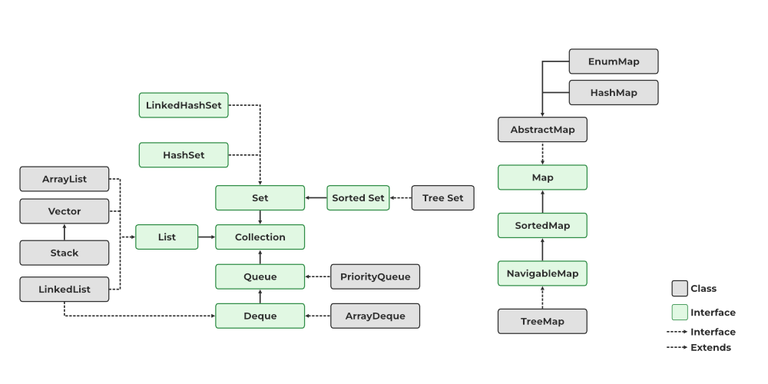
Hierarchy of Collections
#### **- `Collection`**
* The root interface of the collection hierarchy.
* Represents a group of objects (elements) and provides basic operations such as adding, removing, and querying elements.
* Subinterfaces include `List`, `Set`, and `Queue`.
#### **- `List`**
* Extends the `Collection` interface.
* Represents an ordered collection of elements.
* Allows duplicate elements.
* Implementations include `ArrayList`, `LinkedList`, and `Vector`.
#### **- `Set`**
* Extends the `Collection` interface.
* Represents an unordered collection of unique elements.
* Does not allow duplicate elements.
* Implementations include `HashSet`, `LinkedHashSet`, and `TreeSet`.
#### **- `Map`**
* Represents a collection of key-value pairs.
* Allows you to store and retrieve values using keys.
* Keys are unique within a `Map`, but values may be duplicated.
* Implementations include `HashMap`, `LinkedHashMap`, and `TreeMap`.
### Using the Java Collections Framework
Here is a basic example of how to use the Java Collections Framework to create and manipulate a simple list:
```java
import java.util.ArrayList;
import java.util.List;
public class Example {
public static void main(String[] args) {
// Create a list of integers
List numbers = new ArrayList<>();
// Add elements to the list
numbers.add(1);
numbers.add(2);
numbers.add(3);
// Iterate through the list
for (Integer number : numbers) {
System.out.println(number);
}
}
}
```
This example demonstrates how to create an `ArrayList`, add elements to it, and iterate through the list using a `for-each` loop. Similar principles apply to other collection types.
### Best Practices
1. **Use the Right Collection Type:**
* Choose the appropriate collection type based on the specific requirements of your application (e.g., `List` for ordered collections, `Set` for unique elements).
2. **Generics:**
* Utilize generics to ensure type safety when working with collections.
3. **Performance Considerations:**
* Be mindful of the performance characteristics of different collection implementations, especially when dealing with large datasets.
4. **Immutability:**
* Consider using immutable collections (e.g., `Collections.unmodifiableList`) when the collection should not be modified after creation.
The Java Collections Framework provides a powerful and flexible set of tools for working with collections in Java applications. By understanding the different interfaces, classes, and best practices, developers can effectively manage and manipulate data structures in a scalable and efficient manner.
---
# Agent Instructions
This documentation is published with GitBook. GitBook is the documentation platform designed so that both humans and AI agents can read, navigate, and reason over technical content effectively. Learn more at gitbook.com.
## Querying This Documentation
If you need additional information that is not directly available in this page, you can query the documentation by asking a question.
Perform an HTTP GET request on the following URL with the `ask` and `goal` query parameters:
```
GET https://codewithmeiy.gitbook.io/core-java/collections-framework.md?ask=&goal=
```
`ask` is the immediate question: it should be specific, self-contained, and written in natural language.
`goal` is what the user is ultimately trying to achieve, the reason they need the answer. Sharing it helps GitBook give you a better, more relevant answer. A goal is most helpful when it describes the outcome the user wants rather than restating the question. For example, with `ask=how do I create an API token`, a goal like `automate deployments from our CI pipeline` lets GitBook tailor the answer to that use case.
The response will contain a direct answer to the question and relevant excerpts and sources from the documentation.
Use this mechanism when the answer is not explicitly present in the current page, you need clarification or additional context, or you want to retrieve related documentation sections.